

IGNOU Assignments 2026 are a mandatory part of every undergraduate, postgraduate, diploma, and certificate programme. The next IGNOU Assignment submission deadline for the December 2026 Term-End Examination (TEE) is expected to be 30 September 2026. Students are advised to submit their assignments before the deadline to avoid any last-minute issues and remain eligible to appear in the December 2026 TEE. Students must submit the correct assignments for their registered courses before appearing for the Term-End Examination (TEE). In this guide, you’ll find the latest assignment submission dates, download links, writing guidelines, submission process, status check, marks, results, and other important updates.
IGNOU Assignment 2026 TEE
You can submit either online through the student portal or offline at your designated study centre. Remember that assignments carry 25-30% weightage and are mandatory for exam eligibility. Always download the latest assignment questions from the official IGNOU website and keep your submission receipt safe. It’s recommended to submit by mid-March to avoid last-minute issues. Regularly check the IGNOU website and your regional centre for any updates regarding submission deadlines or guidelines.
IMPORTANT – please DO NOT plagiarize! Check the deadlines on the official website since extensions are possible, and we suggest starting early so you can keep on track.
| Feature | Details |
| University | Indira Gandhi National Open University (IGNOU) |
| Academic Sessions | January 2025 & July 2025 |
| Assignment Type | Handwritten, Course-wise |
| Submission Mode | Offline (Regional/Study Centre) & Online (if allowed by RC) |
| Weightage | 30% of total marks |
| Requirement | Mandatory for appearing in Term-End Exams |
| Status Check | Online via IGNOU portal |
IGNOU Assignment Submission Last Date 2026
IGNOU conducts Term-End Examinations (TEE) twice every year—June and December. Students must submit their assignments before the prescribed deadline for the respective examination session. The tentative assignment submission schedule for 2026 is given below.
| TEE Session | Expected Assignment Submission Last Date |
|---|---|
| June 2026 TEE | 31 March 2026 |
| December 2026 TEE | 30 September 2026 (Tentative) |
IGNOU Assignment Submission Last Date 2026 (Course-wise)
dates are the expected deadlines for the December 2026 Term-End Examination (TEE). IGNOU may revise or extend the submission deadline through an official notification. Always check the due date mentioned on your assignment question paper or the latest notice issued by IGNOU.
| Programme | December 2026 TEE Assignment Last Date |
|---|---|
| BA (Bachelor of Arts) | 30 September 2026 (Tentative) |
| BCom | 30 September 2026 (Tentative) |
| BSc | 30 September 2026 (Tentative) |
| BCA | 30 September 2026 (Tentative) |
| BBA | 30 September 2026 (Tentative) |
| BSW | 30 September 2026 (Tentative) |
| BLIS | 30 September 2026 (Tentative) |
| MA | 30 September 2026 (Tentative) |
| MCom | 30 September 2026 (Tentative) |
| MSc | 30 September 2026 (Tentative) |
| MBA | 30 September 2026 (Tentative) |
| MCA | 30 September 2026 (Tentative) |
| MSW | 30 September 2026 (Tentative) |
| PG Diploma Programmes | 30 September 2026 (Tentative) |
| Diploma Programmes | 30 September 2026 (Tentative) |
| Certificate Programmes | 30 September 2026 (Tentative) |
How to Download IGNOU Assignment Questions
Before writing your assignment, make sure you download the latest question paper for your admission session.
Follow these simple steps:
- Visit the official IGNOU Assignment website. @https://www.ignou.ac.in/studentService/download/assignments
- Open the Student Zone section.
- Click on Assignments.
- Select your programme.
- Choose your admission session.
- Download the assignment PDF for your course code.
How to Write IGNOU Assignments
To avoid rejection, follow these guidelines while preparing your IGNOU assignment.
- Write answers in your own handwriting.
- Use A4-size ruled sheets.
- Write neatly using a blue or black pen.
- Answer every question carefully.
- Mention the correct course code on each assignment.
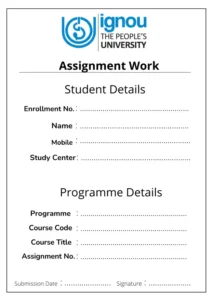
- Attach the official IGNOU assignment front page.
- Arrange assignments course-wise before submission.
- Staple or bind each course separately if required.
IGNOU Assignment Submission Login Process
IGNOU has made the assignment process easier by providing online submission portals for most regional centres. To submit assignments online, you need to use your regional centre’s official submission link and follow a simple login process.
IGNOU Assignment Submission Link (General)
Every regional centre of IGNOU has its own submission link. These links are usually shared through the official websites of each RC (Regional Centre).
You can visit: https://ignou.ac.in
Then, navigate to “Regional Centres” → Your Region → Assignment Submission” to find your official portal.
Examples:
- RC Delhi-1
- RC Delhi-2
- RC Patna
- RC Jaipur
- RC Lucknow, etc.
Always ensure that the link you are using belongs to an official IGNOU Regional Centre website (ending in .ignou.ac.in).
IGNOU Assignment Submission Link RC Delhi-1
If your study centre falls under Regional Centre Delhi-1, you must submit your assignments through the official RC Delhi-1 portal.
Steps:
- Open the website,
- Click on “Assignment Submission” under the Announcements section.
- Read the guidelines carefully.
- Fill in your details and upload your PDF assignments.
- After successful upload, download the acknowledgment slip.
IGNOU Assignment Submission Link RC Delhi-2
For students under Regional Centre Delhi-2, the process is similar but through a different link.
Official
Steps:
- Visit the official portal.
- Go to the Assignment Submission section.
- Fill your details like Enrollment Number, Programme Code, and Study Centre Code.
- Upload scanned PDFs of your assignments.
- Download and keep your confirmation receipt for safety.
IGNOU Assignment Download
Downloading your IGNOU assignment question papers is easy and important to start your work. Follow these steps:
- Go to the IGNOU website: webservices.ignou.ac.in/assignments.
- Find the Sheldon “Student Zone” and click on “Assignments.”
- Select your program (e.g., BA, MA, Diploma) and session (January/July 2025).
- Choose your course code to download the PDF question paper.
- Make sure the assignment is for the correct session (June 2025 or December 2025).
IGNOU Assignment Front Page
IGNOU Assignment Submission Status
After submitting your assignment, it’s important to check your IGNOU Assignment Status to confirm that the university has received and processed it. You can check the status online by visiting the official IGNOU Assignment Status portal and entering your Enrollment Number and Programme Code.
The status usually updates within 3 to 4 weeks after submission. If your assignment shows Completed, it means it has been evaluated and the marks have been updated. A Submitted or Received status indicates that IGNOU has received your assignment and it is under evaluation. If the status shows Not Received or Not Submitted, contact your Study Centre or Regional Centre immediately with your submission receipt for assistance.
How to Check IGNOU Assignment Submission Status:
-
Visit the official IGNOU website: https://admission.ignou.ac.in/changeadmdata/StatusAssignment.asp
-
Enter your Enrollment Number and Program Code.
-
Click on Submit.
-
You’ll see your assignment status — “Received,” “Not Received,” or “Marked.”
IGNOU Assignment Weightage 2026
Assignments carry 30% weightage in most IGNOU programmes, while the Term-End Examination contributes 70%.
| Component | Weightage |
|---|---|
| Assignment | 30% |
| Term-End Examination | 70% |
IGNOU Assignment Marks Check 2025
IGNOU Assignment Marks carry 30% weightage in most programmes. After your assignment is evaluated, the marks are updated online. You can check them by visiting the official IGNOU Grade Card portal and entering your Enrollment Number and Programme Code. If your marks are not updated after a few weeks, contact your Study Centre or Regional Centre.
IGNOU Assignment Result 2026
The IGNOU Assignment Result 2026 is included in your Grade Card and is not published separately. Once your assignment marks and Term-End Examination (TEE) marks are updated, the course status changes to Completed. If you do not submit the assignment or score less than 40%, your course status will remain Not Completed, even if you pass the TEE.
IGNOU Assignment 2026 FAQs
1. What is the last date for IGNOU Assignment submission 2026?
For the December 2026 Term-End Examination (TEE), the expected last date to submit IGNOU assignments is 30 September 2026. Students should regularly check the official IGNOU website for any deadline extensions.
2. How can I check my IGNOU Assignment Status 2026?
You can check your assignment status online by visiting the official IGNOU Assignment Status portal and entering your Enrollment Number and Programme Code. The status is usually updated within a few weeks after submission.
3. How should I write an IGNOU Assignment?
Write your assignment in your own handwriting on A4-size sheets using a blue or black pen. Include the official assignment front page, answer all questions clearly, and avoid copying content from books or the internet.
4. Can I submit my IGNOU Assignment after the last date?
Generally, late submissions are not accepted unless IGNOU officially extends the deadline. Missing the submission date may delay your eligibility for the Term-End Examination.
5. How do I prepare a good IGNOU Assignment in 2026?
Read the questions carefully, write original answers in simple language, organize your responses neatly, and review your work before submission. Always follow the guidelines provided by IGNOU.
6. Are IGNOU assignments compulsory?
Yes. Assignments are mandatory for all eligible courses. Without submitting them, you cannot complete the course, even if you appear for the Term-End Examination.
7. What is the weightage of IGNOU assignments?
Assignments carry 30% weightage in most IGNOU programmes, while the Term-End Examination (TEE) contributes the remaining 70%.
8. How can I download IGNOU Assignment question papers?
You can download the latest assignment question papers from the official IGNOU website under the Student Zone → Assignments section by selecting your programme and session.
9. Can I submit IGNOU assignments online?
Yes, some Regional Centres allow online submission. If online submission is available for your study centre, you can upload scanned PDF copies through the official Regional Centre portal. Otherwise, assignments must be submitted offline.
10. What happens if I fail my IGNOU Assignment?
If you score less than 40% or do not submit your assignment, you must submit a fresh assignment in the next applicable session. Your course will remain Not Completed until you pass both the assignment and the Term-End Examination.
11. How long does IGNOU take to update assignment marks?
IGNOU usually updates assignment marks and status within 3 to 6 weeks after submission. However, the timeline may vary depending on the Study Centre and Regional Centre.
12. Can I check my IGNOU Assignment marks online?
Yes. You can check your assignment marks through the IGNOU Grade Card by entering your Enrollment Number on the official portal.